A slow website is not always a blank screen. Sometimes the page is visible but the main image arrives much later. You tap the menu and nothing happens for a moment. Or you reach for a button just as the page jumps because another element has loaded above it.
Core Web Vitals measure these moments. They show when the main content appears, how quickly the page responds to an action and whether the layout stays in place while loading.
The measurements are useful, but 100/100 is not a business goal by itself. Visitors need to see your offer, open the menu and submit a form. That should work on an ordinary phone, not only on a perfect test device.
PageSpeed and Core Web Vitals are different measurements
PageSpeed Insights shows a 0–100 Lighthouse score and real-user data when enough data is available. Lighthouse runs a repeatable lab test under simulated conditions. A score of 90–100 is green, 50–89 is orange and below 50 is red in Lighthouse.
Core Web Vitals use real Chrome visits from the previous 28 days when there is enough traffic. A new page may have too little data, so PageSpeed can show origin-level data or no field data at all. The lab test helps locate a problem; real-user data shows what people on different phones and connections actually experienced.
When you open a report, ask:
- is this the mobile or desktop test;
- is it a lab run or data from real visitors;
- which URL was measured;
- what does a visitor notice on that URL;
- what changed after the fix?
Three Core Web Vitals without a technical dictionary
LCP: when does the main content appear?
Largest Contentful Paint measures how long it takes for the largest visible element to appear, often the hero image or the main headline. Up to 2.5 seconds is considered good; above 4 seconds is poor.
INP: how quickly does the page react?
Interaction to Next Paint measures the response to a click, tap or key press. A mobile menu that opens after a noticeable pause or a calculator that lags is an INP problem. Up to 200 milliseconds is good; above 500 milliseconds is poor.
CLS: does everything stay in place?
Cumulative Layout Shift measures unexpected movement. You try to tap a button, an image appears and the button moves underneath your finger. Up to 0.1 is good; above 0.25 is poor.
Google evaluates these values at the 75th percentile: roughly three out of four visits should stay within the good range. See the official thresholds on web.dev.
What makes a website slow?
In my experience it is rarely one line of code. A site usually becomes slow as layers accumulate: a theme and page builder, more plugins, a chat widget, booking software, advertising pixels and analytics tools. Nobody is sure which old pieces are still needed, so they remain.
Common causes include:
- images and videos much larger than the space in which they are shown;
- pages assembled from several themes, builders or block systems;
- old styles and scripts left behind after a redesign;
- plugins without a clear job;
- analytics and advertising tags nobody reviews;
- too many font files and variants;
- videos, maps, chats and booking widgets loaded immediately;
- new features added without removing the old solution.
WordPress or a page builder does not automatically make a site slow. A modern site can also be slow when it loads a huge background video and ten external services. WebP or AVIF can reduce image size, and responsive images prevent a phone from downloading a desktop file. Fonts and third-party scripts deserve the same review.
A practical example: a WordPress site went from 43 to 85 on mobile
One WordPress project started with a mobile Lighthouse score of 43. The largest visible element appeared after 9.6 seconds and Total Blocking Time was 620 milliseconds. After optimisation the score reached 85, first visible content appeared after 1.5 instead of 3.3 seconds, LCP moved from 9.6 to 3.2 seconds, TBT from 620 to 130 milliseconds and CLS from 0.059 to 0.002.
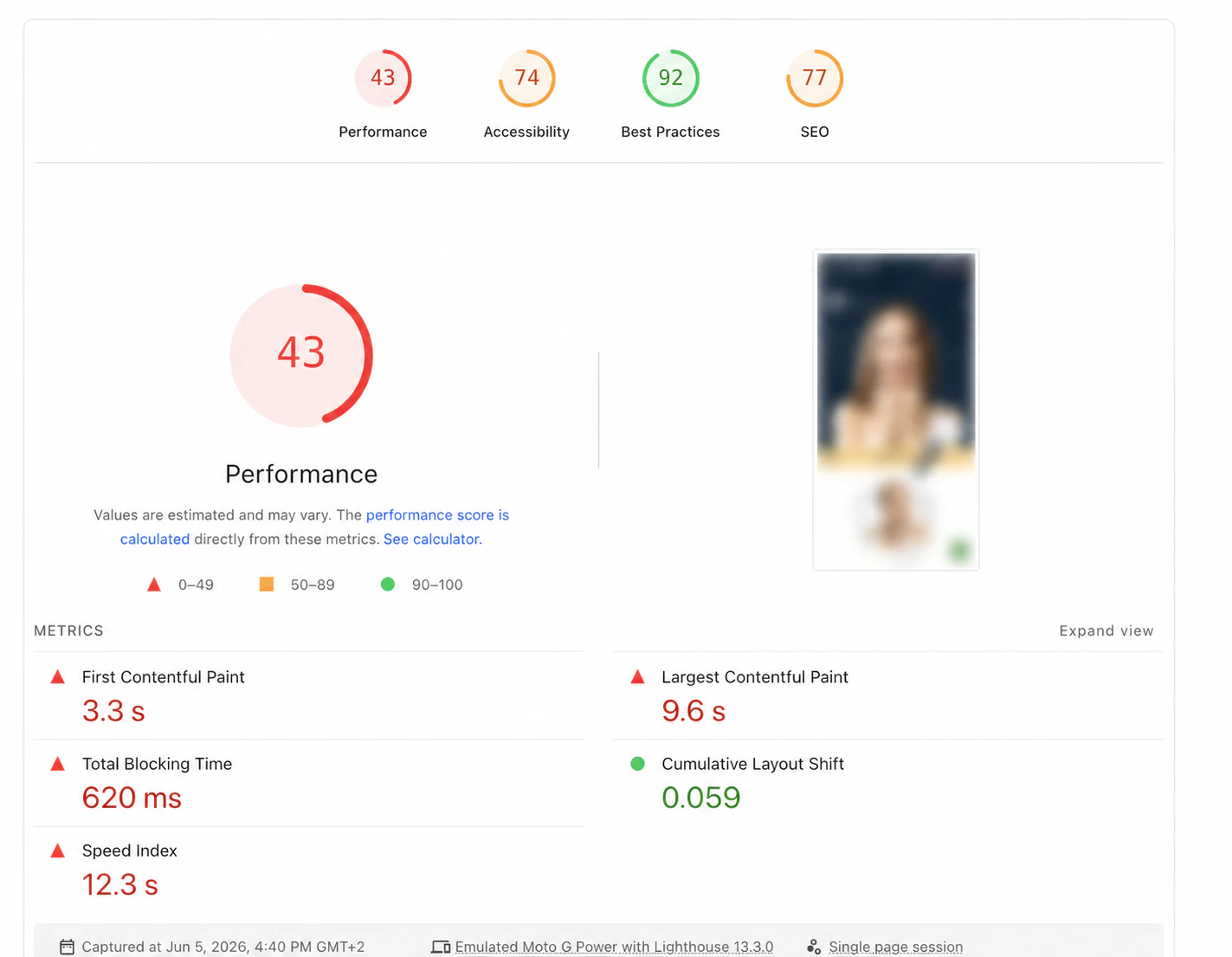
Before optimisation: mobile Lighthouse test with Performance 43. The website preview has been anonymised.
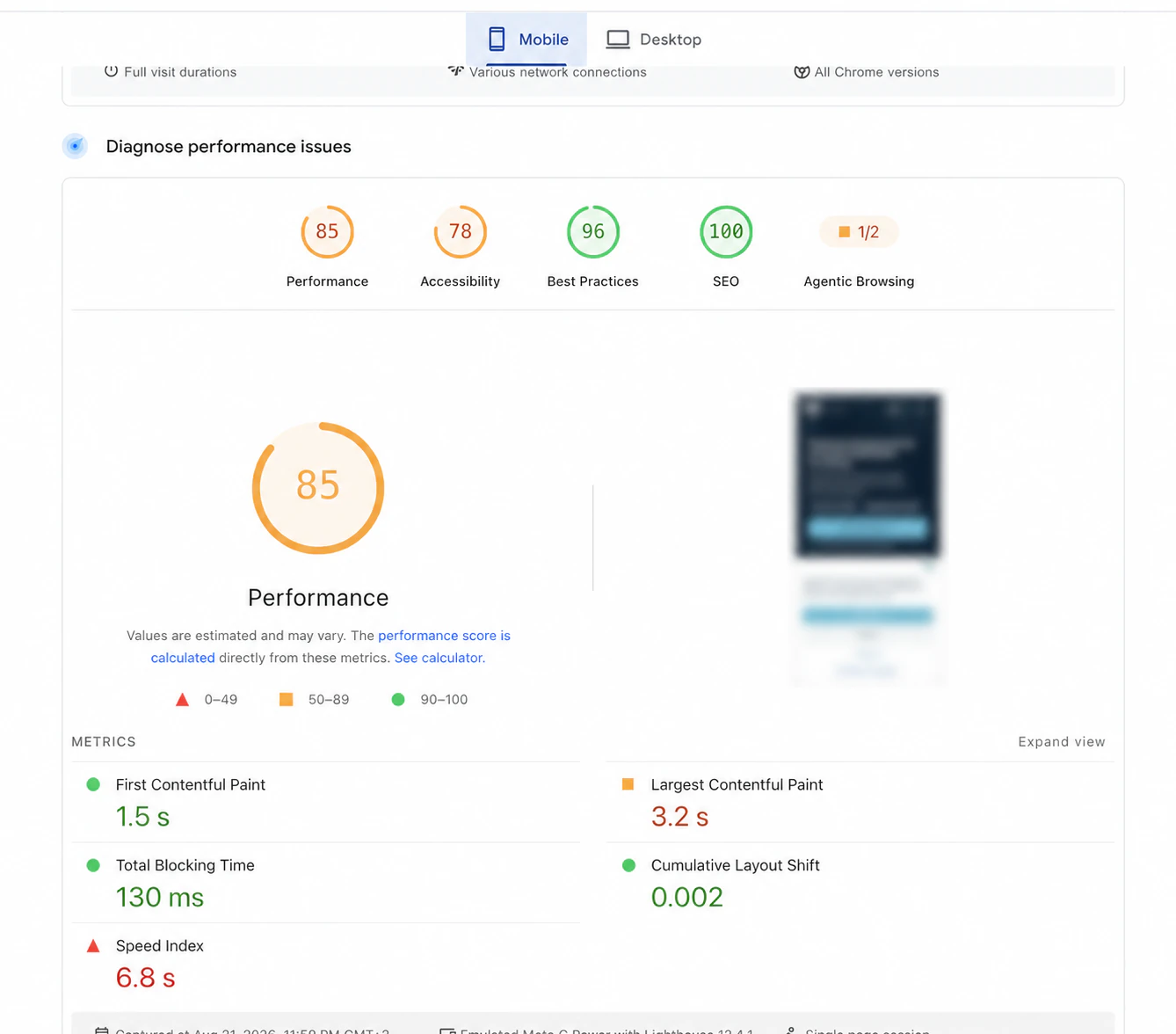
After optimisation: mobile Lighthouse test with Performance 85. The website preview has been anonymised.
These screenshots were taken at different moments, not in a controlled experiment. They show the progress of that project, not a promise for every website. Lighthouse results can vary with the test environment and version.
Is a score of 100 necessary?
At OROS I use 80+ on mobile and 90+ on desktop as practical targets, not as an official Google rule or a guarantee. A mobile score of 80 is still orange in Lighthouse. The real questions are:
- Can a mobile visitor see the offer quickly?
- Do menus, buttons, forms and calculators respond without a noticeable pause?
- Does the page stay still while people read and tap?
- Does it remain workable after analytics, content and necessary features are added?
A score of 85 after starting at 43 can be a sensible stopping point. The final points may take so much work in an old builder that rebuilding is the better decision. A compact static site can reach 100, but even Lighthouse says that 100 is unusually difficult and not expected from every site.
When can you optimise the existing website?
An orange or red score is not an automatic reason to rebuild. First identify the source of the delay. Images can be resized, unused plugins and scripts removed, font variants reduced and videos deferred until someone wants to view them.
Repair is a good fit when the structure still works, the team can use the site and the largest problems are clear. After every change, test forms, bookings, analytics and advertising measurement. A high speed score is worthless if enquiries stop arriving.
When is rebuilding more sensible?
Rebuilding becomes interesting when years of edits, multiple builders and fragile dependencies mean that one correction breaks another part. Moving useful content to a clean base can cost less than endless cleaning.
For service pages and landing pages that do not change daily, I often use Astro. It can pre-build pages as static files, giving the browser a simple foundation. Astro is not a speed button: large video, many fonts and external scripts still slow it down, while a well-built WordPress site can perform very well.
For a repair-or-rebuild decision I first check what causes the delay, which content and functions must stay, who needs to edit pages, what old code can be removed, how much maintenance remains and how forms, analytics and existing URLs will be preserved.
Read WordPress, website builder or custom build: what fits your business? when comparing technical foundations.
How to check whether your website is too slow
Open the important pages on an ordinary phone, preferably once on mobile data. Test the menu, primary button, form, booking flow, payment or calculator. Then run the mobile and desktop URL separately through PageSpeed Insights and note whether field data exists.
Do not conclude from one run. Repeat under similar conditions and check the actual customer route, not only the homepage. After a change, confirm that the number improved without breaking the functions that matter.
What should you ask a developer?
- What is a visitor waiting for now?
- Which image, font or script causes the largest delay?
- Which external services are still useful?
- Are we looking at real-user data or a lab test?
- Can the main problems be fixed without rebuilding?
- What will be removed and what will be tested afterwards?
- Why is a new build recommended?
- How will the mobile version be checked after the change?
“We will install a speed plugin” is not a diagnosis. A developer should know the cause, explain the risk and say what is realistic within the current site.
Does a fast website help with Google?
Google uses page-experience signals, including Core Web Vitals, in its systems. Good scores do not guarantee a high position: a fast page with weak or irrelevant content is still a weak result. Speed is good maintenance, not a trick for instant SEO traffic. Visitors should see the information quickly and reach the next step without friction.
Investigate first, then decide whether to rebuild
A slow website does not need to be replaced automatically. Start with mobile, the key pages, images, third-party scripts and the limits of the current system.
Send your link and describe the problem in the enquiry form. I will explain what can be improved within the existing site and when a new build is justified. If you are planning a new project, read what a website costs in the Netherlands in 2026 first; the same form works for a first price indication.
About the author

Daniel Orosz
Daniel builds websites and digital systems from Kerkrade and has worked with web technology since 2009. Since 2018 he has worked for dental practices. He explains technical choices in plain language.
More about Daniel →A useful next step
Assess the speed of your existing website
Send your current URL and the problem you notice. Daniel can review mobile loading, the difference between lab and field data, the highest-priority causes and a realistic next step.
Request an existing-site assessment →