Three systems that make the practice faster — not more complicated
A treatment plan that used to take two hours now takes shape while the dentist thinks out loud. An anamnesis that shortens itself to what matters for this patient. And an agenda you can open from the sofa, not only from the front desk.
Built on 7 years inside dentistry·NL / BE·Multilingual
In beta — which is exactly the moment worth joining
All three systems work; they just are not running at dozens of practices yet. That is where your advantage sits: as one of the first you get the setup shaped around how you work, support straight from the person who built it, and you keep today’s rate. What you bring in decides what goes in next.
Digital anamnesis
Anamnesis on a tablet
Only the questions that matter for this patient
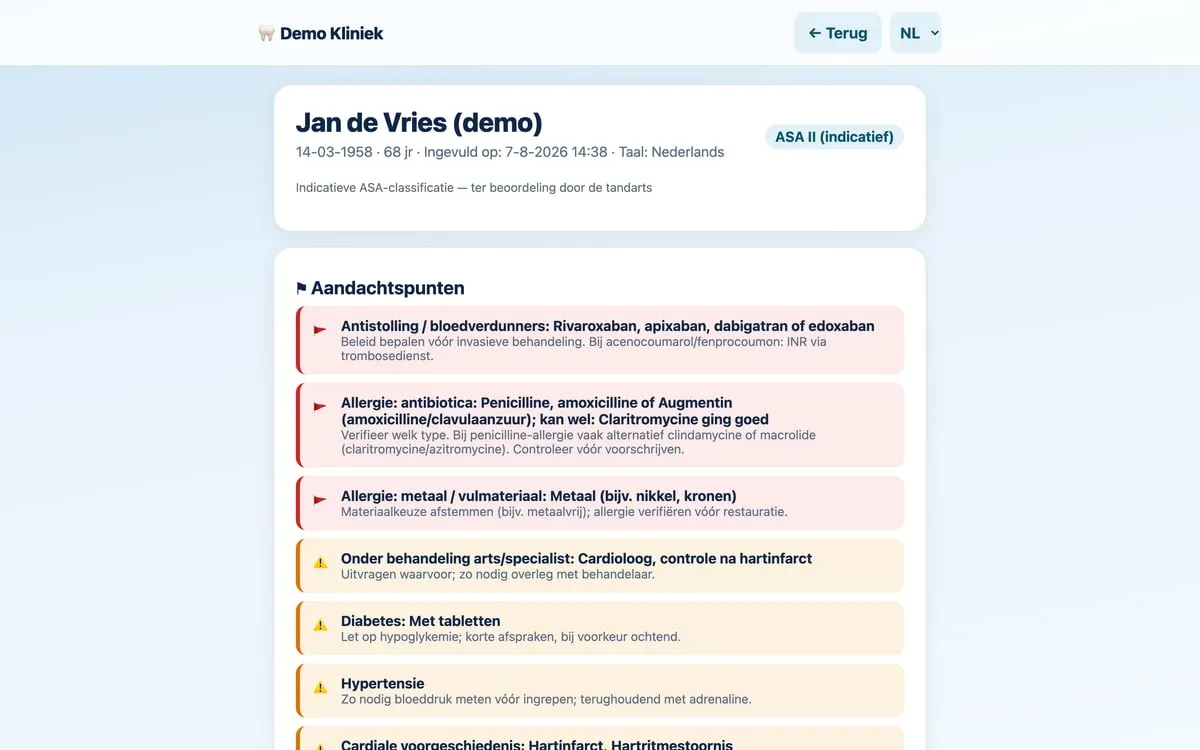
The patient fills in the medical questionnaire on a tablet in the waiting room. The form adapts as they go: someone with nothing to report is done in a couple of minutes, and someone who does have a condition gets exactly the follow-up questions the dentist needs.
What goes wrong today
Standard forms ask everyone the same thirty questions, in a fixed order you cannot change. The patient ticks row after row of "no", gets impatient and starts clicking faster than reading — with older patients that falls apart fastest. The modules inside practice software are often Dutch-only and come with one fixed template; separate form builders are expensive and you have to set up every scenario yourself. What is left is paper, which a staff member then retypes into the system by hand.
What it does differently
- Questions that adapt — A man is never asked about pregnancy. Someone who answers "no allergies" is not asked about penicillin anyway. Someone who is allergic to antibiotics is asked which ones. Each branch stops the moment the answer is clear.
- The practice decides the questions, not the vendor — Which questions appear, in what order and what weighs heavier is set to how you work. No fixed template to work around because the vendor decided it that way once.
- Shorter form, less click fatigue — With irrelevant questions gone, the patient still has attention left for the ones that matter. That makes the answers more reliable, not just faster.
- Genuinely multilingual — The patient picks their own language and answers in one they understand. The dentist reads the result in Dutch. For border regions and dental tourism that saves an interpreter or half a conversation.
- Red flags before the patient is in the chair — The moment the patient finishes, the clinician gets a list: anticoagulants, allergies, cardiac history, diabetes — each with what it means for treatment. Red for "decide on an approach first", amber for "keep this in mind".
- No gap between filling in and seeing — What the patient enters is there right away. There is no sync step or retyping in between — exactly where things get lost in real practice.
- Indicative ASA classification — Based on the answers, the clinician gets a suggested ASA class. As an indication, for them to assess — not an automated diagnosis.
Agenda & planning
An agenda for multiple clinicians
An overview that still holds up with seven clinicians and four rooms
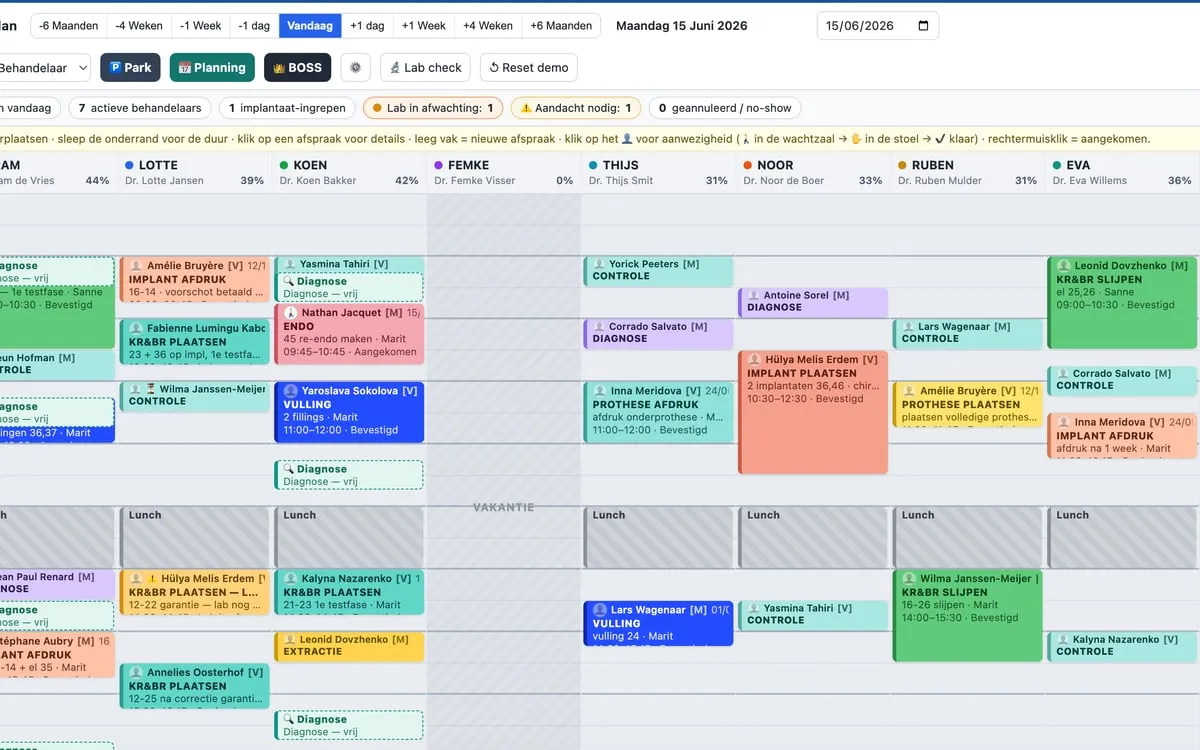
An agenda that runs in the browser: on the front-desk PC, on a laptop at home, on a phone in between. Room planning, holidays, alternating rosters and online bookings in the same view.
What goes wrong today
A lot of practice software is tied to a handful of fixed PCs in the building, usually Windows-only. You know the result: the practice manager screenshots the agenda into the group chat, because otherwise a clinician at home sees nothing — and on that image they cannot open a patient card or an X-ray. Even a cloud version is often still a thin client on Windows: no mobile view.
What it does differently
- Open it from the sofa, not just from the front desk — No install per workstation and no licence per extra screen. Anyone with access opens the agenda where they are: from the desk, from the sofa at home, or on a phone while getting coffee, to see who the next patient is and what is in their file.
- Room planning alongside clinician planning — You schedule not just who, but where. An implant procedure that needs a specific room no longer collides with a check-up that happened to be booked there.
- A-week / B-week and alternating rosters — Clinicians on an irregular rhythm — every other week, fixed half-days, rotating locations — sit in the roster itself.
- Holidays and absence in the same view — Time off visibly blocks the agenda, so nobody books into it by accident and the daily occupancy figure actually means something.
- Moving appointments without friction — Drag an appointment to another slot or another clinician; drag its bottom edge to change the duration. In many systems that same move is a dialog with fields and a handful of clicks — while moving appointments is precisely what happens most.
- Online bookings land in the same agenda — What a patient books online shows up in the same overview — not in a second system you have to check separately.
Treatment plans
Treatment plans in minutes
From two hours in Word to a plan that is done before the patient stands up
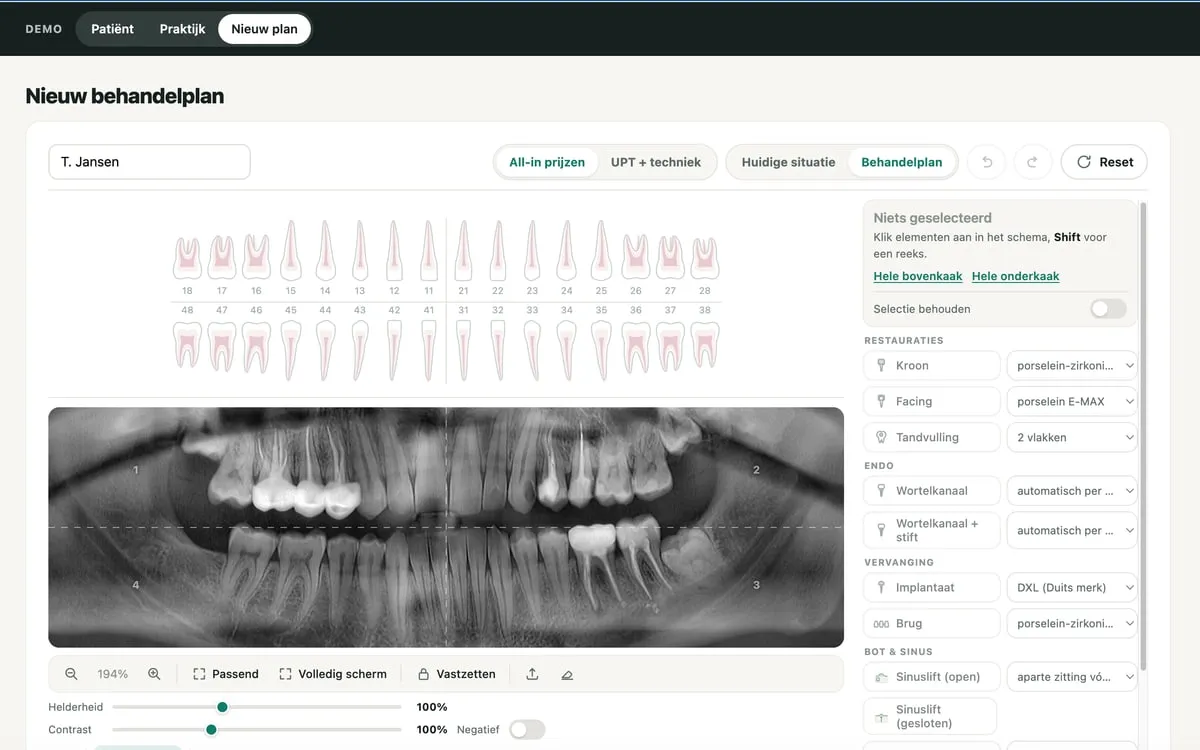
Click on the X-ray or the tooth chart to say which element gets which treatment; the plan and the total follow along. Made for the clinician and for the treatment coordinator who walks the patient through it.
What goes wrong today
Building large plans in classic practice software takes time: many separate codes, many screens, and a printout full of lines the patient does not understand. On top of that, such systems are built for a handful of fixed PCs in the building and are usually Windows-only: a sixth or seventh workstation means another licence of a few hundred euros a year, and X-ray or other parts come as separate modules you buy on top. Precisely for extensive restorations and dental tourism — where the plan is the moment of truth — that works against you.
What it does differently
- Plan on the X-ray itself — The image is numbered and you click directly on which element gets a crown, filling, extraction or implant. What you point at is what ends up in the plan.
- Open it where you are, without an extra licence — The plan lives in the browser, not on one fixed PC. A coordinator looking at it from home or a dentist pulling it up chairside does not cost another workstation — and no separate X-ray module is needed to see the image alongside it.
- A tooth chart that keeps up — Next to the image sits the chart with FDI numbering. Current situation and proposed plan are two views of the same picture, so the patient sees the difference at a glance.
- All-in pricing or UPT + lab costs — One switch. A regular practice works with UPT tariffs and lab costs; an all-in clinic puts treatment prices in. Neither means rebuilding the plan. UPT is the Dutch nomenclature — every country has its own code list and lab items, and I build those in on request.
- Made by someone who watched it go wrong — I have seen treatment plans built in Word with a calculator next to the keyboard: two hours of work, and a single typo cost thousands of euros. This is the answer to that — the plan takes shape while the dentist thinks out loud and points a finger at the X-ray.
- For the coordinator too, not just the dentist — Whoever discusses the plan with the patient can adjust and print it themselves, without pulling the clinician in for every change.
- A printout the patient understands — Stripped back to what the patient actually wants to know: which phases, what to expect and what it costs. Not a hundred codes to get lost in — those belong in the bookkeeping, not in the conversation at the table.
Why these three
Built from the practice, not from a feature list
For seven years I was the only IT person inside a dental organization with several locations. These three systems are the places where it chafed every single week.
From someone who knows the practice
Not an outside agency learning the sector. I already know the questions worth asking — and the irritations worth removing.
Use one or all three
The systems work on their own. If you only want the anamnesis, you only use the anamnesis.
Dutch company, Dutch invoicing
Based in the Netherlands, registered with the KvK. Pay by invoice or iDEAL — no mandatory credit card.
More attention than a large vendor gives
In the beta phase you get the setup tailored to you and a short line to the builder. That is exactly what a software house with thousands of customers cannot offer you.
Questions
What practices usually ask
Can I buy this today?
The systems work and are in beta. You are not buying a box off the shelf: we set it up together around your practice, you pay the beta rate and keep it afterwards. In return I stay close and adjust wherever it rubs in your day-to-day.
Does this replace our practice management software?
No. It is meant to sit alongside what you have, at the points where that system makes life hard — the anamnesis, scheduling across several clinicians, or building large treatment plans.
What about patient data and GDPR?
Medical data falls under the strictest category of the GDPR, so this is settled before the first real patient, not after. The setup: the application runs on a server inside the EU (Hetzner, Germany) and the database is managed Postgres (Supabase) in an EU region, created in the practice’s name. You are the owner and the controller; I only get the access needed to build. Backups go to EU storage that also belongs to the practice. On top of that: a data processing agreement, personal access that is logged, and retention periods agreed up front. And to be straight about the rest: the architecture follows what the GDPR requires, but I do not hold certifications such as NEN 7510 yet; those follow at around ten connected practices, when the process pays for itself. I would rather say so now than have you find out later. The demos I show run on invented data.
Which languages does the anamnesis support?
Dutch, English, German, Ukrainian and Russian. Adding a language is a matter of translation, not rebuilding.
Does it work on a tablet and on a phone?
The anamnesis is made for a tablet in the waiting room. The agenda works on a computer and on a phone, because looking at it on the go is the whole point.
Does this work outside the Netherlands?
Yes. The tariff codes in the treatment plans are currently the Dutch UPT nomenclature, but every country has its own code list and lab items — I build those in on request. The rest is not country-specific: the agenda works the same anywhere and the anamnesis is already multilingual.
What does it cost?
For the pilot phase I quote per practice, depending on which systems you use and how big you are. Practices that join early keep that rate.
What if Oros Agency stops — or something happens to you?
A fair question about software from one builder. The answer is not "I won’t" — the answer is that it is set up so you do not depend on me.
- Your own records stay the source — These systems do not replace your practice software. Every completed anamnesis and every treatment plan goes back as a PDF into the patient record where it belongs. If this disappeared tomorrow, everything you made is still sitting in your own system.
- The database sits in the practice’s own name — A managed Postgres database (Supabase) in an EU region, created on the clinic’s own account — you are the owner and administrator, I only get the access needed to build. Backups land in EU storage that is also yours. Separately, you pull everything out in one click at any time, in an open format: no ticket, no export fee.
- The architecture is ready now, escrow at around ten practices — Honest about the stage: architecturally the handover already works — your database is in your name and the code sits separately from it. A formal escrow agent gets added once around ten practices are running; before that the annual cost does not add up. Until then one trusted contact has access to the source code and you get their details when you sign: if I am out for a long time or the project ends, that person releases the code and your database without you having to wait for me. Ordinary web technology, so taking it over needs no rebuild.
- You know who is on the other end — No support portal and no ticket number: you have my phone number. With a large vendor you are customer number whatever; here you get an answer from the person who built it — and who spent seven years working inside a practice.
Want to see it work?
In half an hour I walk you through all three with your situation as the example — and I would like to hear where it chafes most for you.
Contact
Happy to just talk it through
Call or message me. I have worked inside a practice myself, so a concrete story about how things run at yours is never too much detail.
- Phone+31 6 34 83 61 18
- Emailinfo@oros.agency
- WhatsAppSend a message